Presets
A preset is a named bundle of configuration keys that can be applied to an object (a tab, a block) in one step, instead of setting each key by hand. Presets live in JSON, ship with the app, and can be extended or overridden per-user.
Where preset files live
Termia reads presets from two locations and merges them, with your own files winning over the shipped defaults:
| Source | Location |
|---|---|
| Shipped defaults | pkg/wconfig/defaultconfig/presets.json and every *.json file under pkg/wconfig/defaultconfig/presets/ |
| Your overrides | <config dir>/presets.json and every *.json file under <config dir>/presets/ |
<config dir> is the same config directory used for settings.json (see
Configuration) — ~/.config/termia on macOS, Linux and Windows alike. Create the
presets subfolder yourself if it doesn't exist yet, and drop a .json file in it following the
same shape as the shipped files below.
Both locations are read the same way: presets.json at the top level, plus any number of extra
files inside a presets/ folder next to it, all merged together. This is why the shipped presets
are split across two files — presets.json and presets/ai.json — instead of one.
How a preset is keyed and structured
Every preset is a top-level JSON object keyed <namespace>@<id>, for example bg@midnight or
ai@global. The namespace before the @ tells you which config keys the preset is meant to set
(bg: keys, ai: keys, and so on); the id after it is arbitrary and is what you reference when
applying the preset.
"bg@midnight": {
    "display:name": "Midnight",
    "display:order": 0.7,
    "display:mode": "dark",
    "bg:*": true,
    "bg": "linear-gradient(135deg, rgba(8, 14, 28, 1) 0%, rgba(16, 28, 56, 0.92) 45%, rgba(8, 10, 18, 1) 100%)",
    "bg:opacity": 0.95,
    "bg:blendmode": "normal",
    "bg:activebordercolor": "rgba(80, 140, 255, 0.9)"
}
Two key prefixes are special, not config values:
display:*— metadata used only by the UI:display:name(label shown to the user),display:order(sort order in pickers),display:mode("light"or"dark", restricts which app-theme mode shows this preset; omitted means "show in both").<prefix>:*: true — a clear-namespace sentinel. Applying a preset with"bg:*": truefirst deletes every existingbg/bg:*key already on the target object, then writes the preset's own keys. Without this, switching from a preset with abg:blendmodeto one without would leave the old blend mode behind on the object. Every shipped preset sets this sentinel for its own namespace.
How a preset gets applied
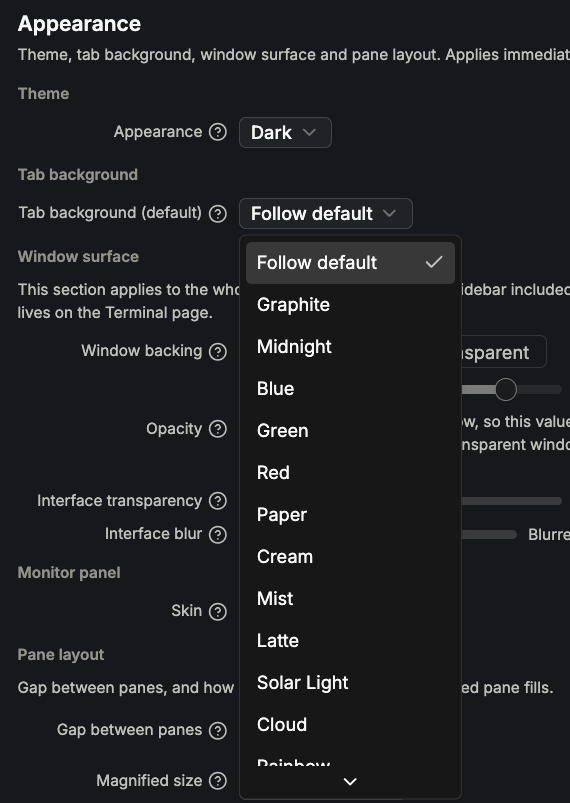
A preset is applied one of two ways:
- By reference, through a config key whose value is a preset id — for example
tab:preset: "bg@midnight"insettings.jsonsets the default background for new tabs, andai:presetin the schema works the same way for theai@namespace (see below for what actually consumes it today). - By direct merge, when UI code reads
fullConfig.presets["bg@midnight"]and spreads those keys onto an object's own metadata — this is what the Appearance tab's theme-card picker does: clicking a card writes the preset'sbg:*keys onto every tab in the workspace (see Customization).
Categories that ship in this repo
Two preset namespaces ship today. This is a change from what older, upstream-derived documentation described — there is no third "AI chat" category, because that view does not exist in this app.
bg@ — tab background presets (active)
25 presets ship in pkg/wconfig/defaultconfig/presets.json, covering both app modes: 16 default/dark
presets (bg@default, bg@graphite, bg@midnight, bg@rainbow, bg@green, bg@blue,
bg@red, bg@ocean-depths, bg@aqua-horizon, bg@sunset, bg@enchantedforest,
bg@twilight-mist, bg@duskhorizon, bg@tropical-radiance, bg@twilight-ember,
bg@cosmic-tide) and 9 light presets (bg@paper, bg@cream, bg@mist, bg@latte,
bg@solar-light, bg@cloud, bg@sage, bg@blush, bg@sand). Keys used inside a bg@ preset:
| Key | Meaning |
|---|---|
bg | CSS background value — a solid color, a gradient, or a combination |
bg:opacity | 0–1 opacity applied to the background layer |
bg:blendmode | CSS background-blend-mode (for presets layered with a tab image) |
bg:imagefilter | CSS filter applied when a user image is layered on top (used by the light presets to desaturate photos so text stays legible) |
bg:imageoverlay | An extra gradient layer composited over a user image |
bg:activebordercolor | The accent color used for the focused block's border while this preset is active |
This is the namespace the Appearance tab and wsh setbg both write to. Add your own by dropping
a file such as <config dir>/presets/mybg.json with one or more bg@yourid entries in the same
shape.
ai@ — present in config, not wired to any UI
pkg/wconfig/defaultconfig/presets/ai.json ships two entries, ai@global and ai@wave, and
settings.json sets "ai:preset": "ai@global" as the schema default. ai@ presets carry keys
like ai:apitype, ai:baseurl, ai:apitoken, ai:model, ai:maxtokens, ai:timeoutms — the
shape a hosted chat AI provider config would need.
As of this repo, nothing reads them. There is no view left that consumes ai:preset or any
ai:* key — the chat view they were built for was removed (see
Termia Agent). A helper method, FullConfigType.CountCustomAIPresets, still
exists in pkg/wconfig/settingsconfig.go to count user-defined ai@ entries, but it has no
caller anywhere in the codebase either. Treat the ai@ namespace as inert configuration schema,
not a feature: setting ai:preset or adding your own ai@yourid preset has no visible effect in
the app today.
The provider/model TT Agent uses is a completely separate system — selected from Settings → AI
or a terminal block's own menu, and broadcast over WPS as agent model state. It does not read or
write ai@ presets at all.
Editing presets safely
Presets are merged, not replaced, so you rarely need to duplicate the shipped file. To change one
existing preset, put only that preset's key in your own <config dir>/presets/ file — your entry
overrides the shipped one with the same <namespace>@<id> key, and every other shipped preset is
left untouched. To add a brand-new preset, use a key that doesn't collide with any shipped id.
There is no in-app preset editor; edit the JSON file directly and either restart Termia or wait for the config watcher to pick up the change (config files are watched for changes while the app is running).