wsh Architecture
This page explains how the pieces of the desktop app talk to each other: the Electron main
process, the on-screen renderer, the wavesrv backend, and the wsh command line tool running
locally or on a remote host. It is written for a curious user, not as a line-by-line code
tour — see wsh Command and wsh Reference for the
user-facing side of wsh.
The four pieces
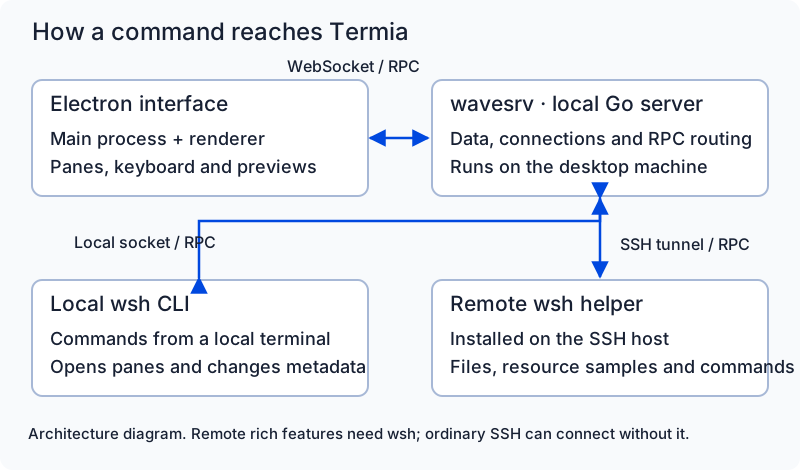
- Electron main process — the native shell of the app. It creates windows, owns the
system tray and native menus, and starts everything else. It never talks directly to your
shell or SSH hosts; it delegates that to
wavesrv. - Renderer — the web page inside each window: the React UI you interact with (tabs, panes, widgets, the terminal view itself). It has no direct access to the filesystem or processes; every action goes out over one of the channels below.
- wavesrv — a Go process that the Electron main process spawns as a child on every
launch. It owns your local SQLite database, your terminal sessions, your SSH/WSL
connections, and the RPC router that everything else plugs into. If
wavesrvexits, the app shuts itself down (there is no headless recovery). - wsh — the command line tool (
cmd/wsh) you can run inside any terminal block. It is a small client to the same RPC systemwavesrvruns, whether the terminal is local or on a remote host over SSH.
Electron main  --spawns-->  wavesrv (Go)
      |                         |  \
   (native OS calls)       SQLite   RPC router
      |                         |        \
   Renderer  <--WebSocket/HTTP--+        wsh (local or remote)
How the renderer reaches wavesrv
The renderer never opens a raw socket. It uses two channels, both authenticated the same way:
/wave/service(HTTP) — a single endpoint used for request/response calls: creating a tab, updating a setting, moving a block. The server dispatches these by reflection, looking up a service name and method name (pkg/service/service.go) and calling the matching Go function. This is whatWOS.callBackendService(...)on the frontend ultimately hits./ws?tabid=<id>(WebSocket) — a persistent connection per tab used for everything that isn't a direct request/response: live updates to objects (tabs, blocks, workspaces), terminal output, and process events. The frontend subscribes to individual objects withwpsSubscribeToObject()and gets pushed updates as they happen; it does not poll.
Authentication. Each time the app starts, the Electron main process generates a random
key in memory and passes it to wavesrv as the TERMIA_AUTH_KEY environment variable. It
then silently attaches that same value as an X-AuthKey header on every request the
renderer sends to wavesrv's HTTP and WebSocket endpoints. wavesrv rejects anything
without a matching header. Because the key is generated fresh per run and only shared between
the two processes on your machine, nothing outside your own app can call into wavesrv.
wavesrv prints its listening address as soon as it is ready (a line containing
WAVESRV-ESTART); the Electron main process parses that line to learn which local port to
point the renderer at before it loads the page.
Where the pushed updates come from. Internally, wavesrv has a small publish/subscribe
broker that anything on the backend can post an event to — an object changing, a terminal
producing output, a connection's status flipping. The broker matches each event against which
route ids have subscribed to that kind of event, and hands it to the same RPC router described
below, which forwards it out over the WebSocket connection for the tab that asked for it. This
is why the frontend's object subscriptions feel instant: it isn't polling wavesrv, it's
sitting on an open connection waiting to be told.
The wsh RPC layer
Inside wavesrv, all backend features are exposed as RPC commands (the full list lives in
pkg/wshrpc/wshrpctypes.go) and dispatched by a router that keys traffic by route id —
a string like conn:<connection-name> for a specific SSH/WSL connection, controller:<blockId>
for the process behind a running block, or tab:<tabId> for a tab. Anything that can hold an
RPC connection — the renderer, a terminal block's controller, or a wsh process — registers
itself under a route id, and the router forwards messages to whichever route they are
addressed to. This is the same mechanism whether the caller is the UI itself or a wsh
command you type by hand.
wsh on your local machine
When you run wsh inside a local terminal block, it connects to a Unix domain socket named
wave.sock inside the app's data directory (see emain/platform.ts for the exact path per
OS) and authenticates with a signed token that wavesrv handed the block when it started the
shell. That token also carries routing context — which block and which tab it belongs to —
so the router knows where to send the command's responses without you specifying it.
If a terminal has no such token available (for example, very early in shell startup), wsh
can instead fall back to talking over OSC escape sequences printed directly into the terminal
stream; wavesrv and the terminal renderer recognize and strip these before displaying
output. This path exists mainly as a bootstrap mechanism.
wsh on a remote host (SSH)
When you connect to a remote host, wavesrv does not just open a shell over SSH — it also
sets up a second channel dedicated to wsh so that remote blocks (editors, file previews,
widgets) work the same way local ones do:
wavesrvasks the SSH connection to forward a Unix domain socket back to itself (streamlocal-forward@openssh.com). This only works if the SSH server allows it; see Common failure points below.- It checks whether a compatible
wshbinary already exists on the remote host at~/.termia/bin/wsh. If it's missing or out of date,wavesrvcopies the correct binary for the remote OS/architecture into place and marks it executable — you may see a one-time prompt asking permission to do this, depending on your connection settings. wavesrvlauncheswsh connserveron the remote host over the same SSH session. This is a small long-lived helper, not a full copy ofwavesrv— it just relays RPC traffic between the remote host and the socket opened in step 1.- The connserver authenticates itself the same way local
wshdoes (a signed token, sent to it over SSH stdin rather than a network call), then the router registers it under aconn:<connection-name>route. From then on, anything you do in a block on that connection — opening a file, runningwshcommands, previewing an image — travels over this same forwarded socket instead of spawning new SSH sessions.
If wsh cannot be installed or the socket cannot be forwarded, the connection still works as
a plain SSH terminal; you simply lose the extra features that depend on wsh (file preview,
remote editing, remote widgets, and the wsh CLI itself on that host).
Shell integration
Whether local or remote, opening a new shell also loads a small startup script (written for
the shell you use — bash, zsh, fish, or PowerShell). This script does a few things: it puts
the platform's wsh binary on your PATH, sets sane UTF-8 locale defaults, emits the escape
sequence that lets the app track your current working directory, and exchanges a short-lived
one-time token (passed in via the TERMIA_SWAPTOKEN environment variable) for your real
session's environment and any additional init script — this is how the terminal picks up
things like per-connection environment variables without them being visible to other
processes on the system.
Common failure points
- The SSH server blocks socket forwarding. If
AllowStreamLocalForwarding(or the more generalAllowTcpForwarding) is disabled on the remotesshd,wavesrvcannot open the forwarded socket described above. The SSH terminal session itself still works; only thewsh-dependent features are unavailable. - The remote
wshbinary can't be installed or is outdated. If the copy step fails (no write permission, unsupported OS/architecture, or you declined the install prompt),wavesrvfalls back to a plain SSH session. - A stale local
wshafter an upgrade. The local binary in the app's data directory is kept in sync with the app version automatically; a remote host only gets a newerwshpushed to it when it reconnects, since installation only happens once per connection.