Key Bindings
Shortcuts come from the current action registry shared by menus, tooltips, the command palette and settings. Open Settings → Terminal → Keyboard for the actual effective table on this machine, including your overrides, conflicts and unavailable actions.
Presets and platforms
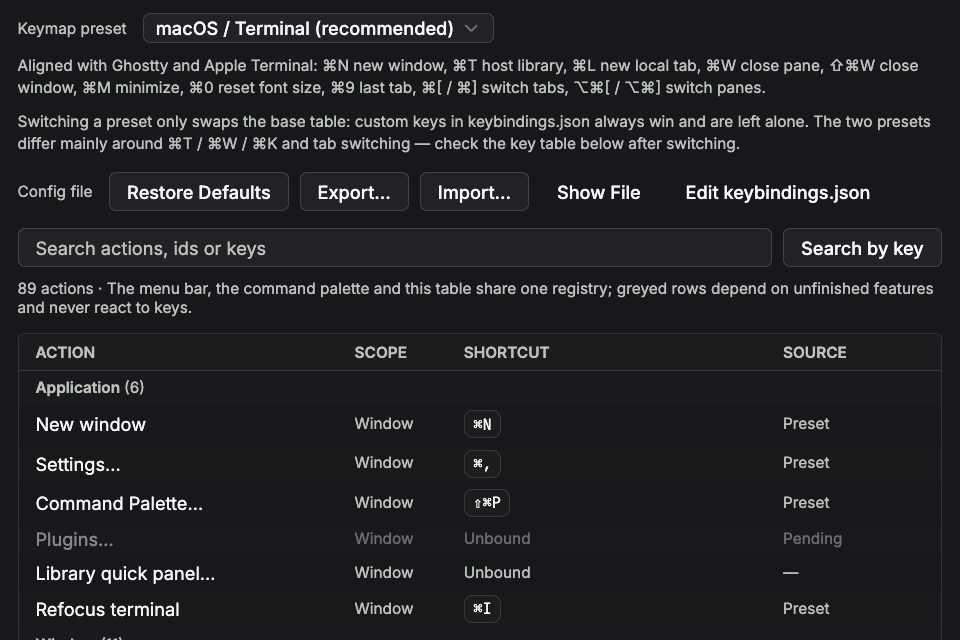
macos-terminal (recommended) and termius select the base table via native:keymap; the removed legacy preset migrates to the recommended one. Windows/Linux resolve Cmd to Ctrl and avoid terminal control characters/collisions: they do not replace everything with Alt. Windows uses physical Alt+Shift+digits for workspaces to avoid AltGr.
The tables below were resolved from the current registry. “—” means no default binding; use the menu or command palette. Grayed unavailable actions do not respond to keys. An Electron development build on macOS uses Cmd; see the native Mac shortcuts.
Application
| Action | Windows · recommended | Windows · Termius | Linux · recommended | Linux · Termius |
|---|---|---|---|---|
New window (window:new) | Ctrl+Shift+N | Ctrl+Shift+N | Ctrl+Shift+N | Ctrl+Shift+N |
Settings… (app:settings) | Ctrl+, | Ctrl+, | Ctrl+, | Ctrl+, |
Command Palette… (app:commandpalette) | Ctrl+Shift+P | Ctrl+Alt+K / Ctrl+Shift+P | Ctrl+Shift+P | Ctrl+Alt+K / Ctrl+Shift+P |
Library quick panel… (vault:quick) | — | — | — | — |
Refocus terminal (app:refocus) | Ctrl+Alt+I | Ctrl+Alt+I | Ctrl+Alt+I | Ctrl+Alt+I |
Windows
| Action | Windows · recommended | Windows · Termius | Linux · recommended | Linux · Termius |
|---|---|---|---|---|
Close Window (window:close) | Ctrl+Shift+Q | Ctrl+Shift+Q | Ctrl+Shift+Q | Ctrl+Shift+Q |
Minimize (window:minimize) | Ctrl+Shift+M | Ctrl+Shift+M | Ctrl+Shift+M | Ctrl+Shift+M |
Workspace 1 (workspace:1) | Alt+Shift+1 | Alt+Shift+1 | Ctrl+Alt+1 | Ctrl+Alt+1 |
Workspace 2 (workspace:2) | Alt+Shift+2 | Alt+Shift+2 | Ctrl+Alt+2 | Ctrl+Alt+2 |
Workspace 3 (workspace:3) | Alt+Shift+3 | Alt+Shift+3 | Ctrl+Alt+3 | Ctrl+Alt+3 |
Workspace 4 (workspace:4) | Alt+Shift+4 | Alt+Shift+4 | Ctrl+Alt+4 | Ctrl+Alt+4 |
Workspace 5 (workspace:5) | Alt+Shift+5 | Alt+Shift+5 | Ctrl+Alt+5 | Ctrl+Alt+5 |
Workspace 6 (workspace:6) | Alt+Shift+6 | Alt+Shift+6 | Ctrl+Alt+6 | Ctrl+Alt+6 |
Workspace 7 (workspace:7) | Alt+Shift+7 | Alt+Shift+7 | Ctrl+Alt+7 | Ctrl+Alt+7 |
Workspace 8 (workspace:8) | Alt+Shift+8 | Alt+Shift+8 | Ctrl+Alt+8 | Ctrl+Alt+8 |
Workspace 9 (workspace:9) | Alt+Shift+9 | Alt+Shift+9 | Ctrl+Alt+9 | Ctrl+Alt+9 |
Tabs
| Action | Windows · recommended | Windows · Termius | Linux · recommended | Linux · Termius |
|---|---|---|---|---|
New Local Terminal (tab:new) | Ctrl+Shift+L | Ctrl+Shift+L | Ctrl+Shift+L | Ctrl+Shift+L |
New Connection… (conn:new) | — | Ctrl+Shift+T | — | Ctrl+Shift+T |
Switch connection… (conn:switch) | — | — | — | — |
Close tab (tab:close) | Ctrl+Alt+W | Ctrl+Shift+W | Ctrl+Alt+W | Ctrl+Shift+W |
Previous tab (tab:prev) | Ctrl+Shift+[ / Ctrl+Shift+Tab | Ctrl+Shift+[ | Ctrl+Shift+[ / Ctrl+Shift+Tab | Ctrl+Shift+[ |
Next tab (tab:next) | Ctrl+Shift+] / Ctrl+Tab | Ctrl+Shift+] | Ctrl+Shift+] / Ctrl+Tab | Ctrl+Shift+] |
Last Tab (tab:last) | Ctrl+9 | — | Ctrl+9 | — |
Hosts (tab:home) | Ctrl+Shift+T | — | Ctrl+Shift+T | — |
Jump to Tab… (tab:jump) | — | Ctrl+Shift+J | — | Ctrl+Shift+J |
Tab 1 (tab:1) | Ctrl+1 | Ctrl+1 | Ctrl+1 | Ctrl+1 |
Tab 2 (tab:2) | Ctrl+2 | Ctrl+2 | Ctrl+2 | Ctrl+2 |
Tab 3 (tab:3) | Ctrl+3 | Ctrl+3 | Ctrl+3 | Ctrl+3 |
Tab 4 (tab:4) | Ctrl+4 | Ctrl+4 | Ctrl+4 | Ctrl+4 |
Tab 5 (tab:5) | Ctrl+5 | Ctrl+5 | Ctrl+5 | Ctrl+5 |
Tab 6 (tab:6) | Ctrl+6 | Ctrl+6 | Ctrl+6 | Ctrl+6 |
Tab 7 (tab:7) | Ctrl+7 | Ctrl+7 | Ctrl+7 | Ctrl+7 |
Tab 8 (tab:8) | Ctrl+8 | Ctrl+8 | Ctrl+8 | Ctrl+8 |
Tab 9 (tab:9) | — | Ctrl+9 | — | Ctrl+9 |
Panes
| Action | Windows · recommended | Windows · Termius | Linux · recommended | Linux · Termius |
|---|---|---|---|---|
New pane (pane:new) | — | — | — | — |
New web pane (pane:new:web) | Ctrl+Shift+B | Ctrl+Shift+B | Ctrl+Shift+B | Ctrl+Shift+B |
New Git pane… (pane:new:git) | — | — | — | — |
New monitor pane (pane:new:sysinfo) | Ctrl+Shift+E | Ctrl+Shift+E | Ctrl+Shift+E | Ctrl+Shift+E |
New file pane (pane:new:preview) | Ctrl+Shift+O | Ctrl+Shift+O | Ctrl+Shift+O | Ctrl+Shift+O |
New SFTP pane (pane:new:sftp) | — | — | — | — |
Open SFTP in this tab (tab:sftp) | — | — | — | — |
Open Folder in Current Terminal (preview:openinterminal) | — | — | — | — |
Split right (pane:splitright) | Ctrl+Shift+D | Ctrl+Shift+D | Ctrl+Shift+D | Ctrl+Shift+D |
Split down (pane:splitdown) | Ctrl+Alt+Shift+D | Ctrl+Alt+Shift+D | Ctrl+Alt+Shift+D | Ctrl+Alt+Shift+D |
Split Left (pane:splitleft) | — | — | — | — |
Split Up (pane:splitup) | — | — | — | — |
Close pane (pane:close) | Ctrl+Shift+W | — | Ctrl+Shift+W | — |
Magnify / restore pane (pane:magnify) | Ctrl+Shift+Enter | Ctrl+Shift+Enter | Ctrl+Shift+Enter | Ctrl+Shift+Enter |
Previous Pane (pane:prev) | Ctrl+Alt+[ | — | Ctrl+Alt+[ | — |
Next Pane (pane:next) | Ctrl+Alt+] | — | Ctrl+Alt+] | — |
Focus pane above (pane:focusup) | Ctrl+Shift+↑ | Ctrl+Shift+↑ | Ctrl+Shift+↑ | Ctrl+Shift+↑ |
Focus pane below (pane:focusdown) | Ctrl+Shift+↓ | Ctrl+Shift+↓ | Ctrl+Shift+↓ | Ctrl+Shift+↓ |
Focus pane left (pane:focusleft) | Ctrl+Shift+← | Ctrl+Shift+← | Ctrl+Shift+← | Ctrl+Shift+← |
Focus pane right (pane:focusright) | Ctrl+Shift+→ | Ctrl+Shift+→ | Ctrl+Shift+→ | Ctrl+Shift+→ |
Grow Pane Up (pane:resizeup) | Alt+Shift+↑ | Alt+Shift+↑ | Alt+Shift+↑ | Alt+Shift+↑ |
Grow Pane Down (pane:resizedown) | Alt+Shift+↓ | Alt+Shift+↓ | Alt+Shift+↓ | Alt+Shift+↓ |
Grow Pane Left (pane:resizeleft) | Alt+Shift+← | Alt+Shift+← | Alt+Shift+← | Alt+Shift+← |
Grow Pane Right (pane:resizeright) | Alt+Shift+→ | Alt+Shift+→ | Alt+Shift+→ | Alt+Shift+→ |
Equalize Panes (pane:equalize) | Alt+Shift+= | Alt+Shift+= | Alt+Shift+= | Alt+Shift+= |
Move focus to the tab bar (pane:focuschrome) | Ctrl+F6 | Ctrl+F6 | Ctrl+F6 | Ctrl+F6 |
Type into all panes (pane:multiinput) | Ctrl+Shift+I | Ctrl+Shift+I | Ctrl+Shift+I | Ctrl+Shift+I |
Broadcast Controls… (pane:broadcast) | — | Ctrl+Alt+B | — | Ctrl+Alt+B |
Replace pane with launcher (block:launcher) | Ctrl+Shift+K | Ctrl+Shift+K | Ctrl+Shift+K | Ctrl+Shift+K |
Focus Pane 1 (pane:1) | Ctrl+Shift+1 | Ctrl+Shift+1 | Ctrl+Shift+1 | Ctrl+Shift+1 |
Focus Pane 2 (pane:2) | Ctrl+Shift+2 | Ctrl+Shift+2 | Ctrl+Shift+2 | Ctrl+Shift+2 |
Focus Pane 3 (pane:3) | Ctrl+Shift+3 | Ctrl+Shift+3 | Ctrl+Shift+3 | Ctrl+Shift+3 |
Focus Pane 4 (pane:4) | Ctrl+Shift+4 | Ctrl+Shift+4 | Ctrl+Shift+4 | Ctrl+Shift+4 |
Focus Pane 5 (pane:5) | Ctrl+Shift+5 | Ctrl+Shift+5 | Ctrl+Shift+5 | Ctrl+Shift+5 |
Focus Pane 6 (pane:6) | Ctrl+Shift+6 | Ctrl+Shift+6 | Ctrl+Shift+6 | Ctrl+Shift+6 |
Focus Pane 7 (pane:7) | Ctrl+Shift+7 | Ctrl+Shift+7 | Ctrl+Shift+7 | Ctrl+Shift+7 |
Focus Pane 8 (pane:8) | Ctrl+Shift+8 | Ctrl+Shift+8 | Ctrl+Shift+8 | Ctrl+Shift+8 |
Focus Pane 9 (pane:9) | Ctrl+Shift+9 | Ctrl+Shift+9 | Ctrl+Shift+9 | Ctrl+Shift+9 |
Terminal
| Action | Windows · recommended | Windows · Termius | Linux · recommended | Linux · Termius |
|---|---|---|---|---|
Find… (app:find) | Ctrl+Shift+F | Ctrl+Shift+F | Ctrl+Shift+F | Ctrl+Shift+F |
Find Next (search:next) | F3 | F3 | F3 | F3 |
Find Previous (search:prev) | Shift+F3 | Shift+F3 | Shift+F3 | Shift+F3 |
Clear Scrollback (term:clear) | Ctrl+Alt+K | — | Ctrl+Alt+K | — |
Views
| Action | Windows · recommended | Windows · Termius | Linux · recommended | Linux · Termius |
|---|---|---|---|---|
Snippets Sidebar (vault:sidebar) | — | — | — | — |
Snippets (sidebar:snippets) | Ctrl+Alt+Shift+1 | Ctrl+Alt+Shift+1 | Ctrl+Alt+Shift+1 | Ctrl+Alt+Shift+1 |
Hosts (sidebar:hosts) | Ctrl+Alt+Shift+2 | Ctrl+Alt+Shift+2 | Ctrl+Alt+Shift+2 | Ctrl+Alt+Shift+2 |
Toolkit (sidebar:toolkit) | Ctrl+Alt+Shift+3 | Ctrl+Alt+Shift+3 | Ctrl+Alt+Shift+3 | Ctrl+Alt+Shift+3 |
Env vars (sidebar:envvars) | Ctrl+Alt+Shift+4 | Ctrl+Alt+Shift+4 | Ctrl+Alt+Shift+4 | Ctrl+Alt+Shift+4 |
History (sidebar:history) | Ctrl+Alt+Shift+5 | Ctrl+Alt+Shift+5 | Ctrl+Alt+Shift+5 | Ctrl+Alt+Shift+5 |
Themes (sidebar:themes) | Ctrl+Alt+Shift+6 | Ctrl+Alt+Shift+6 | Ctrl+Alt+Shift+6 | Ctrl+Alt+Shift+6 |
Zoom In (view:zoomin) | Ctrl+= / Ctrl+Shift+= | Ctrl+= / Ctrl+Shift+= | Ctrl+= / Ctrl+Shift+= | Ctrl+= / Ctrl+Shift+= |
Zoom Out (view:zoomout) | Ctrl+- | Ctrl+- | Ctrl+- | Ctrl+- |
Actual Size (view:zoomreset) | Ctrl+0 | Ctrl+0 | Ctrl+0 | Ctrl+0 |
Help
| Action | Windows · recommended | Windows · Termius | Linux · recommended | Linux · Termius |
|---|---|---|---|---|
Keyboard Shortcuts… (help:shortcuts) | — | — | — | — |
Export Diagnostics… (help:diagnostics) | — | — | — | — |
Overrides and hot reload
keybindings.json in the configuration directory maps action IDs to key descriptions. Use a string, an alias array or null/an empty array to unbind:
{
  "app:commandpalette": "Ctrl:Shift:p",
  "pane:splitright": ["Ctrl:Alt:d", "F6"],
  "pane:splitdown": null
}
An override replaces all preset keys for that action. Saving reloads bindings without restarting sessions. Invalid top-level JSON retains the last valid table; bad individual entries are reported. Reset backs up the old file; import validates the document, while export includes the preset, overrides and a readable effective table.
Scopes and reserved keys
IME composition, text fields, terminal search and modal dialogs have different scopes; shortcuts do not indiscriminately intercept text input. Avoid binding app actions to common shell control keys or OS shortcuts. Settings reports reserved keys and conflicts. When correction/history suggestions are open, Tab/Enter/Escape first go to those popups.
The directional split chord is Ctrl+Shift+S, then an arrow. Escape cancels; another key cancels and remains normal input. Timeout or focus loss also cancels it.
Global hotkey and editors
app:globalhotkey is a separate OS-level reveal shortcut and requires restarting the app. Monaco, embedded web pages and external TUIs have local keymaps; the effective action table and the relevant surface's instructions take precedence.