FAQ
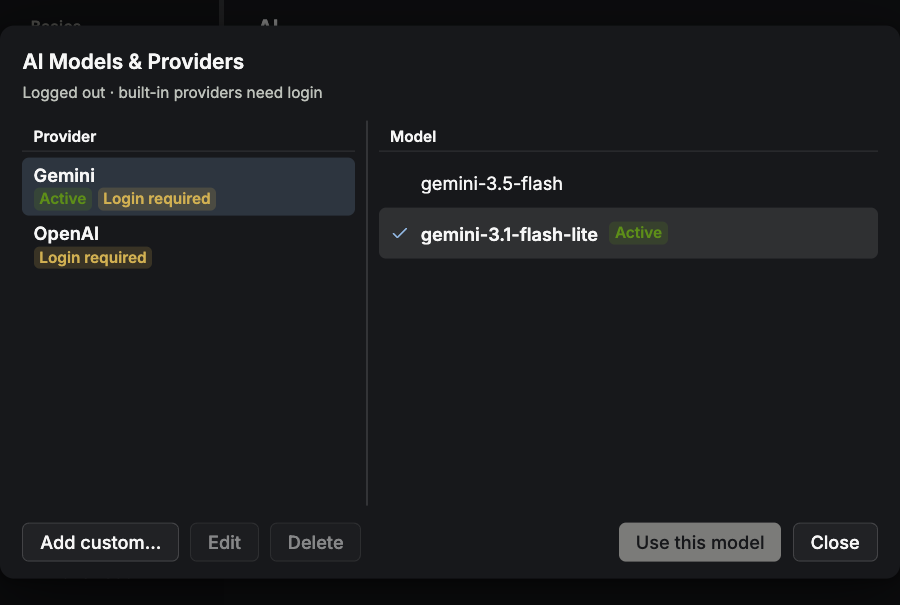
How do I choose or change the TT Agent model?
Open Settings → AI → Manage providers & models…, then choose a provider and model. This choice is shared by TT Agent sessions. Selecting a model, updating or deleting a provider restarts running TT Agents, so finish the current operation first. Custom BYOK needs no Termia login; built-in services need a configured service and account. TT Agent's runtime is included with the application; see TT Agent for use.
What happened to AI presets?
ai:preset does not select TT Agent models. Manage providers and models on the AI settings page. Independent CLIs such as Claude Code and Codex have their own configuration; this selector does not configure them.
How do I enable Shift+Enter for Claude Code and other coding tools?
Termia can make Shift+Enter send an escape sequence plus a newline (\u001b\n) instead of a
regular carriage return, which is what Claude Code and similar coding agents expect. This is
controlled by the term:shiftenternewline setting (off by default).
To enable it globally for all terminals:
wsh setconfig term:shiftenternewline=true
To enable it for just one terminal block:
wsh setmeta term:shiftenternewline=true
You can also set it directly in your settings.json:
"term:shiftenternewline": true
How can I see the block numbers?
Hold down Ctrl+Shift; a number badge appears on every block while you hold the keys, and
disappears when you release them. You can disable the overlay entirely with the
app:showoverlayblocknums setting (false to disable; it defaults to true).
Where does my configuration live, and how do I reset it?
Termia keeps two separate directories:
| Directory | Default location | Override |
|---|---|---|
Config (settings.json, presets.json, widgets.json, termthemes.json, …) | ~/.config/termia on macOS, Linux and Windows | TERMIA_CONFIG_HOME, or XDG_CONFIG_HOME |
| Data (database, logs, agent files, …) | macOS: ~/Library/Application Support/termia; Linux: ~/.local/share/termia; Windows: %LOCALAPPDATA%\termia\Data | TERMIA_DATA_HOME, or XDG_DATA_HOME |
If an older combined ~/.termia directory exists on your machine (from a previous install),
Termia keeps using it for both config and data instead of the locations above.
The easiest way to open your config is:
wsh editconfig
which opens settings.json in Termia's own preview editor (pass a filename, e.g.
wsh editconfig presets.json, to open a different config file).
To reset your settings to the shipped defaults, quit Termia completely, then delete or rename
settings.json inside your config directory and start Termia again — it regenerates the file
from its bundled defaults. This only touches app preferences; it does not delete your terminal
history or Vaults data. Vaults entries live under the configuration directory.
How do I make a remote connection?
Click the connection icon in a block's header — a laptop icon when the block is local, or the
⇄ icon once it is pointed at a host — and either pick an existing connection from the dropdown
or type one directly: user@host, wsl://<distro>, or aws:[profile]. See
Connections for the full set of connection types and what each one supports.
Why does a remote connection fail?
Hover the connection icon in the block's header: while connecting it turns amber and reads
"Connecting to <host>"; if the attempt fails it turns red, reads "Error connecting to <host>",
and appends the underlying error Termia received. The most common causes are the same as any SSH
client's: a wrong host, port or username, a key the remote host does not accept, or a host key in
~/.ssh/known_hosts that no longer matches the host. Termia reads your normal ~/.ssh/config and
~/.ssh/known_hosts, so a connection that fails here will usually fail with plain ssh too — that
is the fastest way to narrow down whether the problem is your SSH setup or something in Termia.
On Windows, how can I use Git Bash as my default shell?
Set the term:localshellpath setting to the location of the Git Bash bash.exe binary. By
default that is C:\Program Files\Git\bin\bash.exe. Remember that JSON needs backslashes
escaped, so in your settings.json:
"term:localshellpath": "C:\\Program Files\\Git\\bin\\bash.exe"
Can I use wsh outside of Termia?
wsh is Termia's own CLI for controlling the app from the command line — see
wsh Command. To prevent misuse by other applications, it requires an access token
that Termia provides, and will not function outside the app.
Do new blocks and splits inherit my shell's current directory?
Yes, automatically, for bash, zsh, fish and PowerShell — Termia injects an OSC 7 hook into
each of these shells' startup on every new block (via ZDOTDIR for zsh, --rcfile for bash, and
equivalent mechanisms for fish and PowerShell), so no manual shell configuration is needed. Every
new block or split created from a block using one of these shells starts in that block's current
working directory.
If a new block or split still opens in your home directory instead:
- Confirm the source block's shell is one of the four above — an unsupported shell (e.g.
nu,tcsh) has no OSC 7 integration and always starts in your home directory. - Check whether your own shell startup files set
ZDOTDIRor otherwise skip sourcing Termia's generated startup file, which would prevent the hook from loading. - On a remote connection, this depends on
wshbeing installed on that host; without it, the remote shell has no way to report its directory back to Termia.
How do I change the app's language?
Open Settings (click your avatar in the tab bar, or File → Settings) → Language, and pick English, 中文, Español or 日本語. The change applies immediately, everywhere — every open tab and window switches at once, and the choice is remembered for future launches.
Why does Termia warn me about ARM64 translation when it launches?
macOS and Windows both have compatibility layers that let x64 applications run on ARM machines. This lets more apps run on those systems while their developers add native ARM support, but it comes with a real performance cost.
For the best experience, uninstall Termia and reinstall the build made for your machine's actual
architecture. You can silence this warning by setting app:dismissarchitecturewarning to true
in your settings.json.
Where does the macOS native client fit in?
Termia also ships a separate, native macOS app built with Swift and AppKit — a different codebase from this Electron app, sharing the same account and sign-in system. If you used this Electron app on the same Mac first, the native app offers to import your configuration, hosts library and data the first time it starts; your original Electron data is never modified by that import. See the macOS app's documentation, and specifically Migrating from the Electron App for exactly what gets carried over.